
Leveraging 3D CAD tools to establish a seamless product data-sharing environment

Product: Solid Edge
Industry: Industrial Machinery and Heavy Equipment

Using Solid Edge XaaS, we can efficiently check and modify product designs before we enter the manufacturing stage, which significantly reduces overall process time.

Lee Chang-woo, CEO
Robogates

Developing robotics and AI technology solutions

Robogates develops and supplies robotics and artificial intelligence (AI) technology solutions to customers in industries such as smart factories, smart farming and warehouse automation. Robogates has an AI Robot Technology Research Center to help designers study and develop robot and AI-related research. Robogates is expanding its operations not only in South Korea but also in foreign markets like Japan, China, Vietnam, Myanmar and India.

Combating increasing production costs

Since Robogates is a small and medium-sized business (SMB), it must develop and sell various robot products such as AI robots and collaborative robots in small quantities, often with short delivery times. Since one designer is in charge of a product project from concept to production design, the designer’s workload has become a big problem. The company was using a 2D computer-aided design (CAD) tool and the designer could not keep up with the work-flow demands. Robogates was looking for a solution to this problem and started using Solid Edge® XaaS software to streamline the product development process. Solid Edge XaaS is part of the Siemens Xcelerator portfolio, the comprehensive and integrated portfolio of software, hardware and services.

Since it was impossible to develop the product in three dimensions with the previous design tools they used, the company could not determine whether interference or parts could be assembled during actual production. Due to this, frequent design changes occurred, resulting in delayed product shipment and deteriorating quality. Robogates repeated these design changes until it could ship the goods as perfect products, resulting in major unexpected losses, such as increased costs and workload due to repetitive manufacturing.

Since product design errors were only discovered at the production stage, product shipments were often delayed. In the previous environment, there was no choice but to evaluate the quality based on the experience of skilled workers and the product results that were completed.

Since there was no link between assembly drawings, part drawings and various lists, workers had to manually update them all or ignore them altogether. Even if designers had the latest version of the blueprint, this resulted in low accuracy. Designers had to spend a lot of time and effort on design work, such as front view, plan view, side view, hidden lines, construction lines and dimensioning. This prevented designers from investing time in improving product quality and over-coming these problems. Robogates began to reassess this process with Jikyung Solutec, a Siemens Expert Partner.null

Focusing on efficiency and productivity

Because a single designer is responsible for a product project from conceptual design to production design, the designer’s workload has always been a major issue. Robogates needed a 3D CAD solution that could be used to organically manage small quantities and varieties of product data during the entire process.

With Jikyung Solutec, Robogates first examined whether it could use Solid Edge XaaS to organically link 2D and 3D product data at each stage of development.

The Robogates team focused on how using Solid Edge XaaS could help them with design verification, design change, design time, efficiency and design data scalability. The designers anticipated that using Solid Edge XaaS would help them efficiently create 3D shapes, drawings, product properties, specifications and bill-of-materials (BOMs). They also hoped that they could use Solid Edge XaaS to remove design changes due to design errors and reduce unnecessary drawing work. They also expected to reduce the amount of ancillary work that could decrease product shipment time and significantly reduce related costs.

Robogates confirmed that using Solid Edge XaaS helped the team re-use existing 2D-based product data and modify products quickly with more freedom. Designers were also able to use innovative product design ideas by using synchronous technology. “Using Solid Edge XaaS, we can efficiently check and modify product designs before we enter the manufacturing stage, which significantly reduces overall process time,” says Lee Chang-woo, chief executive officer (CEO) for Robogates.

However, it was still difficult to introduce new solutions and change the existing process that employees were familiar with. To introduce this new software solution, each department went through lengthy discussions and implemented Solid Edge XaaS training for designers. The team also relied on success stories of similar companies and they highlighted many advantages of using Solid Edge XaaS. Using Solid Edge XaaS allowed designers to modify work faster and more easily, which ultimately sped up the design process tremendously.null

Benefits at every stage of production

As a result, Robogates used Solid Edge XaaS to develop collaborative robots for smart factory implementation and robot products for customers in warehouse automation. The company has improved productivity by using multiple BOMs, including robot product simulation and 3D shape information. This helped the designers share product data using the new data flow system, that delivered accurate product information to product processing and and manufacturing processes and also improved the re-use rate of product data.

Using Solid Edge XaaS product data management helped make collaboration between departments more seamless. Now, when there is a request related to product analysis, designers use the Solid Edge XaaS simulation to obtain the product analysis result.

By using Solid Edge XaaS, the designers performed assembly and interference checks between parts and the simulated product operation prior to actual production, which eliminated many problems. Even when Robogates deployed multiple robots in a customer’s smart factory, they were able to easily check interference during operation in advance.

Previously, the team had to produce prototypes for each product to identify problems or performance in actual operation, which was time-consuming and costly. Using Solid Edge XaaS to perform interference checks between parts and product operation simulation led to a reduction in product design errors, which enabled more complex mechanism design as well as reduced overall product production costs by 15 percent compared to the previous environment.

By using Solid Edge XaaS and the BOM input and output function, they produced accurate workorders, which was useful in the production and parts purchasing process.

Additionally, Robogates used Solid Edge XaaS to create complete 3D models for each robot product. Now the team can easily produce a driving simulation and actual images of robot products and create customer presentations and product promotional materials to use for the sellers, which also helped increase sales.

“In the robot product development stage, it is now possible to use Solid Edge XaaS to easily and quickly identify interference problems during complex operations that were difficult to grasp at a glance in the past,” says Chang-woo. “We can use Solid Edge XaaS to correct problems immediately during the product design stage.”null

In the robot product development stage, it is now possible to use Solid Edge XaaS to easily and quickly identify interference problems during complex operations that were difficult to grasp at a glance in the past. We can use Solid Edge XaaS to correct problems immediately during the product design stage.

Lee Chang-woo, CEO
Robogates

Mold specialist reduces the time from concept to part order by 40 percent; significantly increases customer collaboration and new business

Product: NX CAM
Industry: Industrial Machinery and Heavy Equipment

I was pleased with our improvement in mold design efficiency. However, I thought we could do more to improve our overall efficiency. To achieve that, we had to unify our CAD and CAM environments.

Akira Kokubo, President
Uyama

Striving to be competitive in the global market

Established in the historical district of Fushimi-ku of Kyoto, Japan, the Uyama Mold Factory (Uyama) has been in the mold production business since 1962. Uyama’s main focus is mold design and production. The company’s customer base covers a number of industries that require high-precision production, including small electronic appliances, automotive, semiconductor and medical equipment. Since the company’s founding, Uyama has been very aggressive in implementing the latest equipment and tools. As part of its business expansion, Uyama opened a new facility for parts production in 2002.

Despite the company’s strength and success, Uyama was facing a variety of challenges. First, the United States recession of 2007-2009 caused a decline in business. Second, foreign competitors increased production capacity, putting downward pressure on pricing. Third, customer requirements were getting more difficult to meet. In addition, the company faced the prospect of replacing a number of experienced engineers who were preparing to retire.null

To overcome these challenges and increase sales, Uyama established three goals: develop a new customer base, improve the efficiency of its mold development processes and differentiate its services from those of competing companies.

“To achieve those goals, we undertook three tasks,” says Akira Kokubo, president of Uyama. “We automated production, cross-trained our engineers and increased sales capacity.”

Uyama knew it needed a top-notch 3D computer-aided design (CAD)/computer-aided manufacturing (CAM) system to reach these goals, so after a thorough evaluation of a number of solutions, Uyama chose NX™ software from Siemens Digital Industries Software.null

Fully utilizing NX

Uyama simultaneously undertook the necessary tasks to accomplish its goals, especially the aggressive use of 3D. In recent years, most of the design data that came from customers was in the form of 3D CAD data, including 3D data changes from surface data to solid data, rather than 2D drawings. To have a smooth data exchange, Uyama needed to change its modeling environment as well.

Furthermore, it was difficult to perform conceptual design or mold base design in 2D and execute parting in 3D. Moreover, doing so was time-consuming and duplicated effort. Uyama needed to change the process to improve efficiency and determined everything had to be done in 3D. The management team found that the 3D system that best meets such mold design requirements is NX, with parametric design capabilities, a rich library and other important functionality that Uyama required. To achieve an efficient end-to-end mold design to machine path generation, Uyama implemented NX in 2002.

At the onset, Uyama designers mainly worked on mold parts. To significantly improve operational efficiency and achieve the company’s motto of “High precision, short delivery time, high added value” and, importantly, differentiate itself from its competitors, Uyama needed to more fully utilize the comprehensive functionality of NX.

To facilitate the successful launch of a fully engaged, 3D-based product development environment, Uyama decided to work with its partner, ISID, for implementation support. With ISID’s help, Uyama deployed an assembly design methodology, parametric mold design and customized parts library. Those efforts have made it possible to share an inventory of mold bases, and notably shortened delivery time to customers. Uyama also automated the creation of bills of materials (BOM) and order forms, significantly reducing human error and enabling greater production efficiency.

Now the entire process – from conceptual design to part order – is conducted in 3D and, as a result, the overall development time has decreased by 40 percent.null

Unifying the 3D environment

“I was pleased with our improvement in mold design efficiency,” says Kokubo. “However, I thought we could do more to improve our overall efficiency. To achieve that, we had to unify our CAD and CAM environments. We wanted even more mold design efficiency and to do that, we needed to cross-train engineers.”

“On the production floor, we already had an environment to follow-up on each other,” adds Teppei Yoshikawa, head of engineering at Uyama. “However, between designers and CAM operators, because of system differences, they couldn’t support each other. The design engineers were using NX, but CAM operators were using a domestic CAM system. The barrier between the two systems was actually quite high.”

To completely streamline the process, it was necessary to have cross-trained engineers with knowledge of the entire mold design process. That led Uyama to seek to unify the system, to bridge design and manufacturing, which triggered an evaluation of NX for CAM use.

Uyama evaluated NX CAM for surface finish, machining time, and NC programming efficiency.null

During the benchmark process it was clear that NX satisfied the machining quality and cycle time requirements. The existing domestic CAM system, developed with Japanese engineers in mind, had provided excellent surface finishing and a short turnaround. “After comparing the machined parts completed with NX to those completed with the existing domestic system, we found that the quality was the same,” says Yoshikawa. “Also, the actual machining time was virtually identical.”

The key advantage of NX CAM is its programming efficiency, which is superior to the existing CAM system.

The entire NC programming process has been streamlined and simplified. To quickly prepare the part model for CAM programming, engineers now use the design tools of NX. The advanced NC programming capabilities of the software enable Uyama to create highly accurate toolpaths with a minimum number of supporting elements. Yoshikawa notes, “Using NX, the company has reduced the number of NC programs necessary to machine parts, thus optimizing the manufacturing process. In addition, the computational time needed to generate the programs has been significantly shortened. By leveraging the capabilities of NX CAM, we have reduced the NC programming time of a typical part by 30 percent.”null

Increased sales

Yoshikawa points out that, by using NX to establish the company’s entire mold production process, Uyama has achieved a smooth data exchange process with customers, achieved consistent high-quality design deliverables and markedly improved its collaboration with customers. As a result, Uyama has increased its business volume; in fact, the new design environment with NX has helped Uyama realize its increased sales goals.

Using NX, the company has reduced the number of NC programs necessary to machine parts, thus optimizing the manufacturing process. In addition, the computational time needed to generate the programs has been significantly shortened. By leveraging the capabilities of NX CAM, we have reduced the NC programming time of a typical part by 30 percent.

Teppei Yoshikawa, Head of Engineering
Uyama

“It’s the largest object we ever scanned!” Artec 3D scans gigantic gas engine in Luxembourg

Product: Artec Leo
Industry: Industrial Machinery and Heavy Equipment

Modern, professional-grade 3D scanners can capture all kinds of objects – from tiny things such as a screw or a human tooth to much larger and more complex objects including vehicles, rooms, or even entire buildings. You can use them from the comfort of your own desk, or take them to remote, faraway places – even those with no electrical outlets or internet connections.

It hasn’t always been this way, though. Until very recently, 3D scanners could only be used indoors, under certain lighting conditions, with a steady power source and powerful computer. They were often bulky and heavy, making them difficult, if not impossible, to maneuver while scanning. Most significantly, such scanners could only capture objects of limited sizes – something that could fit on your desk like a sculpture bust, or a flower pot. Anything larger was either too difficult, too time-consuming, or simply impossible to scan.

This was the situation the team at the Luxembourg Science Center found themselves in back in 2016 when they decided to digitize one of Luxembourg’s national monuments called “Groussgasmaschinn” – the world’s largest blast furnace gas engine. To find the best possible way to capture an object as big as this, they reached out to the 3D scanning experts at Artec 3D headquarters in Luxembourg.

Gas Engine #11

Built in 1938 by Ehrhardt & Sehmer, the Groussgasmaschinn is the largest gas engine ever built

Built in 1938 by German manufacturing company Ehrhardt & Sehmer by order of a Franco-Belgian consortium called “Hauts-fourneaux et Aciéries de Differdange, St-Ingbert & Rumelange” (HADIR), the Groussgasmaschinn is so large it could contain an entire tennis court, and then some. It is 26 meters long, 10.5 meters wide, and 6.5 meters high, weighs 1,100 tons, and was able to produce 11,000 horsepower, or up to 7000 kilowatts. It has four cylinders, each of which had a capacity of 3,000 liters, and an 11-meter and 150-ton flywheel, which rotated at 94 RPM. The engine was operated by 12 workers per shift, and during its lifetime (1942-1979) produced more than 6,000 kW of power from blast furnace gas (a waste product generated by the combustion of coke fuel in blast furnaces).

The Groussgasmaschinn in the Differdange Gas Plant in 1940. Photo courtesy of the Luxembourg Science Center

Located in Differdange, Luxembourg’s industrial town 27 kilometers southwest of Luxembourg City, in a former steel production plant currently owned by world-leading steel and mining company ArcelorMittal, this 1,100-ton industrial masterpiece stands as the last witness of a once booming, now bygone era of the Luxembourg steel industry.

It was one of 14 other gas machines of various sizes and horsepower installed in the Differdange Gas Engine Plant between 1896 and the 1940s, with the Groussgasmaschinn being the largest. The engine was installed and put into full operation in May 1942, two years after the Grand Duchy of Luxembourg was occupied by Germany during World War II. Despite the Nazi occupation, there were no service interruptions, bombardments, or explosives planted in the vicinity of the Gas Plant throughout the entirety of the war. And at the end of the war, the gas engine was left intact.

The engine was not only the largest ever built, but probably one of the last ones as well, due to the emergence of more efficient and readily available steam turbines. After its shutdown in 1979, the Groussgasmaschinn remained abandoned for nearly 30 years. It came back from the brink of oblivion in 2007 when Luxembourg’s Ministry of Culture designated it as a National Monument worthy of preservation and restoration. Thanks to the support of the Groussgasmaschinn Association (further evolved into the Luxembourg Science Center) and a privately held firm called “GGM11” that served as the project’s sponsor, restoration work began five years later, in 2012, and is still ongoing.

It was during this time that the Center developed the idea not simply to restore the gigantic engine back to its best shape, but also to digitally preserve it for future generations. In 2016 they reached out to Artec 3D in Luxembourg, but even the best of the scanning technology available at the time wasn’t able to capture something this huge. Fast forward a few years, and with new 3D scanning options developed and available, Artec was ready to scan an object as massive as this.

“We’ve been meaning to scan this engine for a very long time, and we’re glad that the technology is finally here to help us do it. There is no other gas engine like this one, and it’s crucial to capture it in its current state,” said Nicolas Didier, President and General Manager of the Luxembourg Science Center.

“This data can not only help us with the restoration process by being able to recreate some missing parts and elements out of 3D scans, it also is a great way to showcase GGM11 to our remote visitors as well as demonstrate the potential of such innovative technologies as 3D scanning, which we’re planning to introduce and teach at the Center later this year.”

Scanning Big

“It’s the largest object we ever scanned! And much bigger than I expected,” said Vadim Zaremba, Deployment and Technical Support Engineer at Artec 3D, when he first visited the Gas Plant to assess the scope of future work in November 2020. After examining the gas engine and passing all the required security procedures in early 2021, Vadim returned to the Gas Plant with his colleague, Technical Support Specialist Raul Monteiro, and all the necessary gear.

As in most cases, the size and complexity of the object determines the scanners to be used. Artec Ray was chosen as the primary scanner for capturing the entire engine, due to its ability to scan large objects from a distance with submillimeter accuracy, while the Artec Leo, a wireless, portable 3D scanner, was chosen as a second device, specifically for capturing high levels of detail from the smaller parts and sections of the engine.

“GGM11 is not only the largest object we ever scanned, but it’s also a very complex one,” added Zaremba. “It has many cavities and hard-to-reach places, that’s why having two scanners that could capture both the entire machine and its smaller parts in high definition (and with two people operating them) was essential.”

The size and complexity of the object determined the scanners to be used: Artec Ray and Artec Leo

The plan was, first, to scan the engine with Ray from as many angles as possible, to capture the entire object, and then go back and scan any missing, smaller, hard-to-reach sections with Leo. Because Ray was scanning at maximum resolution (point density), to save some time, the team decided to split up. Zaremba was positioning Ray at various locations, at one particular angle, 5 to 15 meters away from the engine, while Monteiro was scanning smaller sections of the engine (which weren’t in Ray’s field of view) with Leo. Then Zaremba moved on to the next spot, and Monteiro followed behind, along the same route.

While Ray silently scans the engine, Zaremba steps away for a minute or two of scanning smaller sections up close with Leo

One of the most challenging tasks was that of scanning the engine from above. To accomplish this, the team had to climb a special bridge built in the 1940s-1950s, which features a cabin hanging 10 meters above the floor, as this was the ideal spot for scanning the engine from multiple angles. This was easier said than done. The bridge was old and unstable, and under the weight of two people plus a 3D scanner, such a foundation was not conducive to creating high-quality scans. To ensure that the scan data was flawless, Zaremba and Monteiro had to remain completely still for several minutes while the scanner did its job.

Overall, it took the team four working days to complete the project, with three-to-four-hour shifts of active scanning every day. The engine was scanned from 18 different angles with Artec Ray, and these were later combined in Artec Studio with 67 more scans made with Artec Leo. The final size of the project came to 186 GB in total, with 170 GB of Leo scans and 16 GB of Ray scans.

Powerful processing

Processing an object as big as this was a challenge in itself. To make sure all the data was processed correctly, Artec 3D Tech Support Engineer Dmitry Potoskuev split up the process into several batches:

He started with Ray data first. He cleaned up the data by removing all the unnecessary objects that the scanner picked while scanning the engine (using the Eraser tool), such as parts of the Gas Plant building, windows, walls, and various other equipment around the GGM11.

Then he focused on unifying the flywheel and other parts data across all 18 scans by erasing specific data from some frames using the Eraser tool. This was necessary because several scans were done on different days, and the position of the flywheel and a few other parts changed a few times when the engine was turned on by GGM11 staff for demonstrations. This could result in some mismatches if those scans were simply merged together as is.

Following that, all Ray scans went through Global Registration to be registered between each other. Then each of 18 scans were processed into meshes using the “Ray scan triangulation” algorithm with Polygon edge length (max) at 10 mm. This was done to filter all the surfaces with a large distance between the vertices, and as a result, to get a more detailed and clean surface afterwards. After that, all the 18 triangulated meshes were processed using Sharp Fusion algorithm to create a single mesh aka “skeleton” of the engine’s model.

The next step was to add all the details captured with Leo. Because of the size of all the data (170 GB), Potoskuev broke the process down into several steps.

First, he duplicated and locked the original Ray mesh. The duplicated copy was simplified to 5-10 million polygons and locked too. This was done to fasten the further registration process. Next, he uploaded all Leo scans (divided into 17 groups during scanning) to the duplicated Ray project, and each of them was registered with the separately simplified Ray project for higher-quality alignment of data.

After all the Leo scans were registered, Potoskuev selected the original Ray mesh and 4-5 raw registered Leo scans, and applied the Sharp Fusion algorithm to create a new mesh. He repeated the process until all the Leo scans were processed with the original Ray mesh into a final mesh of the gas engine.

The final mesh consisted of around 350 million polygons, which were then reduced to 10 million polygons for further post-processing, using such features as Hole Filling tools, the Smooth Brush, and Bridges. The total processing time for the largest gas engine ever built? All done within two weeks, or 80 hours of actual time.

Speaking about some of the challenges he faced while working on the model, Potoskuev said, “Time was definitely the greatest challenge. This project was so big, not only did scanning and processing take a long time, but transferring the data from the scanners to the computer, and then into Artec Studio, could take up to as much as 5-6 hours…just for transferring! We’re talking about almost 200 gigabytes of data – it’s the largest and most time-consuming object we’ve processed, for sure.”

But as with the best things, patience pays off. “I’ve never worked on a project as massive as this,” said Potoskuev. “It’s amazing that with the 3D scanning technology we have today, something so vast and inaccessible has been digitized right down to its finest details.”

From 1940s all the way to 2020s, the Groussgasmaschinn got a second breath thanks to the power of 3D scanning technologies

The final result

While this massive task is now complete, the engine’s story is far from over.

“With this gigantic engine 3D scanned, we can use this data to restore some missing parts and preserve it in its current state, so even if it loses its shape with time, we can still go back to this 3D model and show it to our future visitors, and use it for restoration purposes,” said Nicolas Didier, President and General Manager of the Luxembourg Science Center.

“We hope to finish the renovation of the engine by 2027-28 and make it an integral part of the Science Center, one of the interactive stations that our visitors can not only see, but interact with as well. And with the two Leos that we purchased earlier this year for our Future Skills program, our students and staff will be able to 3D scan it on their own!”

Biesse Group implements digital transformation with Teamcenter

Product: Teamcenter
Industry: Industrial Machinery

A company that digitally transforms successfully becomes a digital enterprise

Digital transformation refers to the adoption of data and digital solutions for business activities and processes. It engages people with digital workflows to promote the full advantage of technology investments across an organization. Digital transformation is more than just replacing manual processes with digital processes – the expected outcomes are cultural change and the adoption of re-imagined processes that take full advantage of well-defined digital strategies.

Global leader in processing machines and systems

Biesse Group is a global leader in wood, glass, stone, plastic, and metal processing technology. Biesse Group’s investments in research and development total €14 million annually, and the company has more than 200 registered patents. The company has 12 industrial sites, 39 subsidiaries, 300 agents and selected resellers, and a 90 percent export share. Founded in Pesaro in 1969 by Giancarlo Selci, the company has been listed in the Star segment of the Italian Stock Exchange since 2001. The current global workforce is 4,100 employees.

Biesse Group is gradually transforming from a machinery and system manufacturer to an organization that offers a wider portfolio of innovative services, helping customers who join the Biesse world to increase their productivity and performance.

Biesse Group identificó la tecnología PLM como un pilar del proceso de transformación digital.

Challenges

  • Digitize, optimize and improve the quality of product development projects
  • Deliver product information to all stakeholders in different business areas and roles
  • Implement a single source of data to feed other applications (ERP, IoT) automatically

Key to Success

Implement Teamcenter as a scalable PLM platform integrated with other enterprise systems

Italian manufacturer of processing machinery implements digital transformation with Teamcenter

Result

  • Established a unified platform to manage and share product information
  • Structured information to support searching and browsing
  • Reduced CAD data management time
  • Reduced product technical information retrieval time by 10 to 20 percent

With Teamcenter, we found a solution that offered all the capabilities we needed. The platform is open to future extension towards other modules and applications, so it offers solid confidence in the long term.

Davide Andreatini, Technical Manager, Machining Center Business Unit, Wood Division Biesse Group

Pressure equipment design specialist Ener Consulting achieves reliable results using Simcenter Femap

Product: Femap, Simcenter
Industry: Industrial Machinery and Heavy Equipment

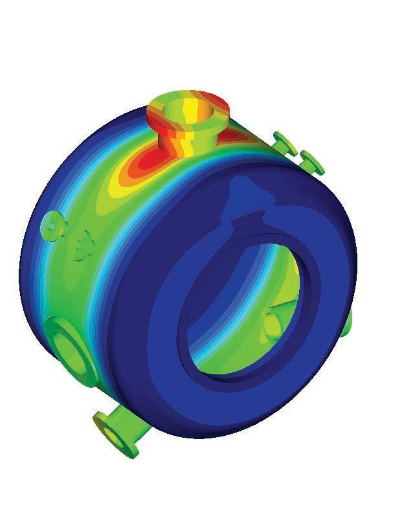
Ener Consulting automated the finite element analysis of pressure vessels in conformity with European and international standards

Verifying designs of pressure equipment

Ener Consulting – Integrated Technical Services (Ener Consulting), founded in 2002 and with headquarters in Prato, Italy, offers engineering consulting to industrial customers. The company’s mission is to work with dedication, to stay abreast of technological developments and to provide customers with reliable results. One of the core services of Ener Consulting is the verification of pressure equipment, exchangers, piping and vessels in the oil and gas, power and chemical industries. Over the years, the business has been gradually extended to other industries, including pharmaceuticals, food, pulp and paper, waste processing and many others.

“The design of pressure equipment has evolved over time for the type and complexity of analysis, requiring high-level specialization and analysis skills,” says Stefano Milani, finite element modeling (FEM) manager at Ener Consulting. “Until the mid-1990s, finite element analysis was regulated by loose standards; there were just a few guidelines with no proven procedures. Customers did not have extensive know-how, and without clear procedures, virtually all verifications of pressure vessels were based on manual calculations.”

Automated analysis with  Simcenter Femap

In the 2000s, the pressure vessel sector made quick progress with the introduction of standards and technology tools to automate analysis tasks. In this context, Ener Consulting started to collaborate with a Siemens Digital Industries Software Solution Partner for Simcenter 3D, Simcenter Femap and Nastran solutions. After using basic FEA software that could not perform accurate analysis and deliv-ered unreliable results, Ener Consulting identified Simcenter™ Femap™ with Nastran® software from Siemens Digital Industries Software as a suitable solution for implementing engineering, analysis and design services, and keeping up with the requirements of target markets.

“Traditional FEA tools that are integrated in 3D CAD software are very simple and intuitive,” Milani says, “but they have limited capabilities and are inadequate to execute accurate analysis in conformity with the strictest standards or in-depth verification. Simcenter Femap offers clear and tangible benefits in terms of speed, ease of use and reliability of results.”

The analysis conducted by Ener Consulting begins from 3D models with relatively complex geometries that are difficult to address with general-purpose FEA software. With Simcenter Femap, Ener Consulting engineers can readily clean the geometry, eliminating unnecessary features for analysis purposes (defeatur-ing). Alternatively, the equipment to be analyzed can be modeled directly in Simcenter Femap as a mesh.

Ener Consulting, developed an add-on module for stress linearization in Simcenter Femap. “With this plug-in, engineers need only a couple of clicks on the screen to get the results they are looking for,” says Francesco Palloni

“The end customers in our reference markets need to check products with a quick and reliable method,” Milani says. “Simcenter Femap helps us deliver the desired results following either a tradi-tional approach or a more modern and advanced method.” The benefits of nonlinear analysis

For the structural verification of pressure vessels, a traditional design-by-analysis approach (stress categorization) often results in component oversizing, because the conventional linear static analysis approach, while proven and easy to apply, is conservative. Engineers must also consider that the linear analysis procedure is articulated and time-consuming when applied to complex geometry. Currently, pressure equipment regulations allow the application of more accurate analysis methods, including using tools such as Simcenter Femap with Nastran for non-linear calculations.

“The ASME boiler and pressure vessel standard, for instance, allows for checking pressure vessels using a nonlinear consti-tutive equation,” Milani explains. “On one hand, it forces the analyst to introduce a more complex constitutive equation in the mathematical model; on the other it requires a tool like Simcenter Femap with  Nastran to solve this type of analysis,” Milani explains.

“The Simcenter Femap nonlinear approach offers a wider admissibility range,” Palloni adds. “With the same geometry and materials, a component can offer higher performance than those predicted with elastic linear analysis. Another benefit is obtained in the postprocessing phase, which is faster and immediate.”

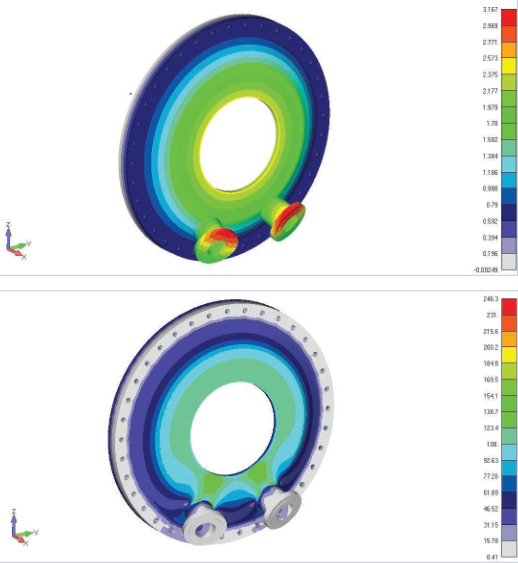
The effectiveness of the Simcenter Femap nonlinear approach was proven in the case of a vessel with a flat bottom of variable thickness. When analyzed with a conventional linear analysis procedure, the component did not pass the elastic test; however, it proved suitable and compliant with applicable standards when it was checked with a nonlinear approach.

The linear approach to pressure vessel verification is constrained by significant design loads which, combined with linear stress analysis methods, results in the noncompliance of the design.Consequently, the initial geometry has to be modified or the load values have to be reduced to fit into the admissible range. Using Simcenter Femap with a nonlinear analysis approach requires more computing power than linear calculations and greater attention to plastic collapse, but offers a more immediate verification of the structural integrity of the pressure equipment.

Artec Leo and Ray join forces to fabricate replacement 15-meter pipe in an offshore vessel

Product: Artec Leo, Geomagic Design X
Industry: Industrial Machinery and Heavy Equipment

At first, the task sounds straightforward enough: To replace a pipe. Add to that the fact that said pipe is 15 meters high, in an offshore vessel and surrounded by other pipes and equipment in a room 18 meters high and 10 meters long and three meters wide, and the complexity of the task starts to show.

The challenge facing Singapore’s Asian Sealand Offshore and Marine (ASOM) who had been tasked with this responsibility onboard the vessel, was how to execute the repair in such a confined and congested space. The nature of the room meant that there would be limited access, and a risk of causing damage to other vital equipment. The procedure needed to be fail-safe.

To get this complex task started, ASOM and Artec 3D’s Gold Certified Partner Shonan Design combined their engineering expertise and technology to resolve this critical problem. Another factor to consider was that all scanning needed to take place entirely on-site. (Spoiler Alert: The handheld Artec Leo’s on-screen real-time display would soon come in very handy.)

“The first step was using Artec Ray, a long-range LiDAR scanner, to capture the geometry of the room and an adjacent room to determine the space and sequencing of the removal and the replacement maneuver,” says Shonan Design’s Chief Application Engineer Lee Siow Hoe.

Able to scan from distances up to 110 meters away, Artec Ray is the fastest and most accurate 3D scanner. It is designed for submillimeter distance precision, which makes it perfect for large objects and long distances. Ray’s laser technology works excellently with ship propellers, airplanes, and buildings. With best-in-class angular accuracy, the data Ray captures is cleaner than other scanners, and its noise levels are kept to a minimum. Besides quick scans, this also makes processing faster and easier.

Artec Ray was set up in nine different locations on the few available flat surfaces around the room, such as staircase landings. For the Ray scan, the tight spaces in the room prevented placement of enough manual targets. To make targets effective, visibility is key and acute angles are discouraged – this was no problem for Ray, which is able to scan and align without targets.

“No checkerboard or sphere targets were used for the Ray scans registration,” Lee explains. “A one-click registration in Artec Studio 14 was enough to auto-align all the Ray scans, based on surface geometries within each scan. This simplified the job greatly.”

The restricted space provided a challenge in the creation of a complete 3D map, but the work was only just beginning. On top of the full Ray scan, a high-quality 3D scan from Artec Leo was needed. The Leo scan would also be able to ‘zoom in’ and capture the details necessary for fabricating the replacement pipe, and to scan any obstructed areas.

Because the pipe is vertical, and given the layout of the room, there weren’t many places to stand with handheld scanners. Instead, two brave team members qualified in rope access techniques were trained in scanning and safety, harnessed with lengths of rope, and were soon rappelling down the vertical pipe spool – rope in one hand, Leo in the other.

If this sounds like a job for seasoned scanners with years of experience, think again: The two rapellers were recently trained in using Artec Leo. The training proved to be straightforward, a tribute to the user-friendly design of the Leo.

“Leo scanners are fast, and with automated alignment, it was easy to resume scanning from where we left off,” a member of the ASOM scanning team said.

If ever there were tasks made for Artec Leo, this would be among them: With onboard automatic processing, the men scanning were able to see the scans being created in real time even without a computer present. Leo’s touchscreen panel also allows the user to zoom in and see if everything has been properly captured – and if it hadn’t, to revisit any areas that the user might have missed. This feature proves especially useful for first-time users in an unfamiliar setting.

The practical training given to the ASOM employees involved practicing on whatever they could adopt as suitable targets – the staircase and common pipe areas, for example. “Familiarity with the equipment was crucial for the job to be successful given the challenges posed”, says ASOM Director Simon Ng.

With a highly accurate scan of the entire room provided by Artec Ray and a focused, detailed scan of the pipe available via Artec Leo, the team had everything they needed. Superimposing data from the Leo scan on the Ray scan, a final global registration ensured that the Leo data fit perfectly with the Ray data.

“The Leo raw data was aligned and processed using the Ray pipe scan as a backbone, so that the entire 15 meter length of the Leo scan had minimum accumulation of error,” Lee says.

With the 15-meter pipe scan processed, the next step was to translate the digital 3D scan data into an accurate 2D isometric drawing to fabricate a replacement.

This was achieved using the Pipe Wizard feature in Geomagic Design X, and some modifications to the original design to facilitate installation were made and incorporated into the 2D drawing.

The scanning project was completed in two days with an onboard team of four people during which the FPSO continued to operate.

“The combination of the handheld Artec Leo and the standalone unit Artec Ray made a very big difference. We managed to capture all the necessary details this way,” says Ng.

“From the detailed planning and execution, I believe we managed to get fantastic results from the scanning and modeling,” Lee adds.

Industrial machinery manufacturer Sparkonix uses Teamcenter Rapid Start to reduce design time by 25%

Product: Teamcenter
Industry: Industrial Machinery and Heavy Equipment

Sparkonix implements PDM quickly to help designers significantly decrease time spent searching for storing and retrieving data

Corralling data

Sparkonix India Private Limited (Sparkonix), which was established in 1968, is a leading manufacturer and exporter of electrical discharge machining (EDM) equipment. The company also produces special-purpose EDM drill machines and metal arc disintegrators, which are used to remove broken taps and drills. Furthermore, the company engineers a range of innovative solutions in steel rebar branding and handling, and construction technologies.

Sparkonix machines typically include hundreds of parts, from fabricated and machined parts to castings, sheet metal, electronics and electrical items mounted directly on mechanical assemblies. Its market is the die and mold industry and special purpose machine (SPM) and special purpose drill (SPD) EDM operators.

Sparkonix uses Solid Edge® software from product lifecycle management (PLM) specialist Siemens Digital Industries Software for computer-aided design (CAD). However, the company was finding it difficult to manage a rapidly expanding amount of design data.

“The amount of CAD data was growing and we needed to manage it better so that no unnecessary duplicates would be created,” says Anand Atole, assistant manager of Design at Sparkonix. “Being able to re-use design data to speed up work was a priority. Also, the number of users accessing data was increasing and we required control of user workflow, so we needed revision management.”

Speeding up the process

Sparkonix is in a highly competitive market, so the company needed to come up with new concepts and designs. The company was intent on improving its existing products and processes without compromising quality. Achieving this while keeping costs in mind was a big challenge, as was meeting deadlines for deliveries of customer orders and providing updates to marketing on changes to designs.

With these challenges delaying the design-to-delivery process, the company knew it needed a solution that would enable it to move significantly faster, especially with customer demand continually increasing.

Sparkonix previously had a central location for data, but it could not be easily searched. Equally frustrating, Sparkonix was unable to reuse the data. In addition, it was hard to avoid creating duplicate data, and anybody could access it. What Sparkonix wanted was total control of its design data, with ease of access, the ability to readily re-use the data and strong security.

Streamlining design data

Sparkonix found the answer to its information management challenges in Siemens Digital Industries Software’s Teamcenter® software Rapid Start configuration.

“By choosing Teamcenter Rapid Start, we have a central repository for design data with strong management capabilities,” says Anand. “We can search our database for required information to use and re-use parts and assemblies.

“Now we are able to efficiently manage product revisions. We can control the access rights to data based on user type, and share updated data easily and immediately. As a result, we have moved to more controlled paperless operations for the design department. Earlier, we had to do manual paperwork to maintain data that is now being handled by our PDM software,” says Anand. Currently, Sparkonix is using Teamcenter Rapid Start to provide design data to purchasing, sales and support. People can view documents and designs in Teamcenter Rapid Start, because the embedded visualization capabilities present designs in CAD-neutral JT format for viewing and markup. Stakeholders don’t need access to CAD applications to collab-orate and get the information they need to make the right product decisions.

“Ultimately, Teamcenter Rapid Start has enabled us to streamline design data and make it available to all for reuse, from design to sales and support. Designers can now concentrate on design rather than on storing, searching for and retrieving data. We have reduced design time by 25 percent.”

Getting into production quickly

Sparkonix opted for Teamcenter Rapid Start because it wanted to get up and running quickly and immediately apply PDM best practices for data and process management. What’s more, the company wanted an affordable option suited to its small business profile.

Teamcenter Rapid Start provided the PDM capabilities Sparkonix needed at a compel-ling price, while giving the company the option to grow into a full-scale PLM implementation at any time. Because Teamcenter Rapid Start is a preconfiguration of Teamcenter, Sparkonix can extend its implementation to PLM while retaining the preconfigured menu options and processes for PDM.

Following the standard PDM deployment methodology and best practices, Sparkonix implemented Teamcenter Rapid Start in just four weeks, taking two days to train its users. The company can easily upgrade with each future release, noting that it takes minimal information technology (IT) expertise to support and maintain the system.

Trimming inventory

Among a long list of examples that demonstrates the software’s advantages, the company is using Teamcenter Rapid Start for the pipes its uses to connect pumps and filters. “With Teamcenter Rapid Start, we are able to get an idea about the different sizes of pipes that are being used,” says Anand. “Then we can decide to limit variations of pipe lengths and settled on some common sizes, so now we avoid maintaining excess inventory.”

Using the preconfigured processes in Rapid Start – such as design review, supplier design exchange and change management workflow – Sparkonix can streamline and better track project status.

Utilizing support

From the start, Sparkonix had the support it needed to succeed. “Our software partner helped at each stage of the implementation process to get us working quickly and effectively,” says Anand. He notes, “Siemens Digital Industries Software’s Global Technical Access Center (GTAC) is always there to help us out with any matter in which we desire assistance.”

Reverse Engineering an Impeller Made Easy with Geomagic Design X

Product: Geomagic Design X
Industry: Industrial Machinery and Heavy Equipment

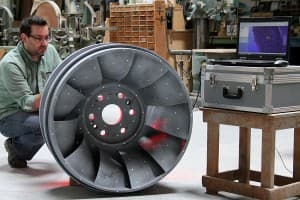
When small business owner Matthew Percival of 3D Rev Eng was contracted by Dependable Industries, a pattern and tooling shop in Vancouver, British Columbia, to assist in the reverse engineering of a power generation Francis Runner casting, the full power of Geomagic Design X was put to the test.

Percival had a very finite, one-day window of time to 3D scan the part. There was no drawing to confirm against, so he had to be able to work quickly and accurately. The working runner that was being reversed engineered was on its last repair cycle and needed to have a replacement casting ready in one year. The scan data was acquired in about four hours using a hand held scanner.

The deep narrow pockets of the hydraulic passages limited the scanner’s range and made complete data acquisition impossible. With about 85% of the part scanned, Percival knew he had enough to make a complete CAD model using the software from 3D Systems.

Percival scanning the Francis Runner casting.

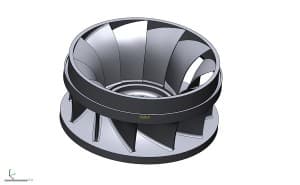
CAD model using the software from 3D Systems.

“For me, Design X is the obvious software choice. The ability to generate solid models directly on the scan data is priceless.”

-Matthew Percival of 3D Rev Eng

Using the data live on site, Percival was able to create sketches and smooth lofted surfaces between the two sides of the acquired data and conform it to the casting using hands on methods in Geomagic Design X. Doing this revealed a number of interesting details to the customer:

  • The center axis of the impeller was no longer square to the
  • vanes which results in an unbalanced and inefficient part
  • The cast surfaces were badly worn and out of typical tolerance
  • The volume of each cavity was inconsistent

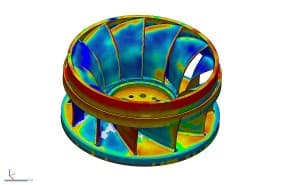
Design X easily overcame these issues. Percival was able to generate sketches on the blade, as well as an accurate smooth surface that he could revolve around the extracted revolution axis. The surface was then trimmed to match the profile and revolved to obtain the proper count of blades. Comparing this data live with color deviation maps to the scan data, Percival was able to ensure that accuracy was within the client’s requirements.

The impeller Scan inside Geomagic Design X

The problem of the part not being on the center axis was easily fixed, since Design X allowed Percival to redesign with design intent. He was able to model the part by extracting the profile, generating a sketch and adjusting the revolution axis to the proper design intent. Lastly, he merged the model and extracted the radii from the scan data, applying it to every blade. Once the model was complete in Design X, he used the software’s LiveTransfer technology to send the entire feature-based solid model into Solidworks and saved it as a native sldprt file for the client.

Using the CAD tools in Design X and the product knowledge provided by the customer, Percival was able to recreate the entire runner as a solid model true to design intent.

Cost savings in decreased downtime of hydro power generation plant

$ 20,000 per day *

Average cost to traditionally reverse engineer a runner

$ 3,800 and 4 days

3D Rev Eng cost

$ 2,500 and 2 days

Cost to manually produce foundry tooling from traditional reverse engineering data

$ 35,000 and 5 weeks

Cost to CNC cut foundry tooling from CAD data made in Geomagic Design X

$22,000 and 3 weeks

Cost savings in finish machining and balancing of a casting made from CNC tooling

$ 3,500

Cost savings and power generation efficiency resulting from highly-accurate hydraulic passages and balancing

UNLIMITED

Conclusion

The successful completion of the Francis Runner project has opened the door for other impeller projects for Percival and 3D Rev Eng. These projects include aquaculture impellers, mining impeller blades and Pelton wheels. Geomagic Design X allows Percival to quickly use complex shapes and surfaces to produce models within hours, which would otherwise have taken weeks.

Industrial diaphragm maker DiaCom achieves seamless transfer of tool design to manufacturing with Solid Edge

Product: CAM Pro
Industry: Industrial Machinery and Heavy Equipment

DiaCom targets new markets demanding higher levels of technology for its complex molded diaphragms

Cutting-edge products, new geographic markets

About six years ago, industrial diaphragm manufacturer, DiaCom Corp. (DiaCom) initiated a shift in its approach to tool design and manufacturing. With a great customer reputation already in place, the time came to upgrade the company’s technologies. The goal: expand into new markets. The Amherst, New Hampshire-based company designs and manufactures innovative, cost-effective molded diaphragms critical to the operation of essential industrial systems and equipment. DiaCom not only produces diaphragms but designs and builds the tooling to manufacture them. The company staffs design and tool departments as part of its business model.

The new technology shifts have allowed entry into new industries requiring more complex diaphragms as well as parallel markets. Those industry targets include aerospace, irrigation, automotive, oil, gas and medical customers. “We wanted to grow dynamically by offering more intricate, cutting-edge products and also expand into new geographic markets in China and Europe,” says Mike Grywalski, manufacturing engineering manager at DiaCom. “There’s more technology demand from these new customers. They don’t just need washers on a garden hose.”

DiaCom customers operate in a different world, with more intricate design demands leaning heavily on parametric modeling to meet government and industry standards. Many of its longtime, established customers now require a similar technological ability to produce more advanced diaphragms.

Design for manufacturing

Expansion required more advanced soft-ware technology. Customers were starting to come to DiaCom with 3D models to work from. The company was using 2D computer-aided design (CAD) software, producing “old-school” drawings that couldn‘t fully define some products. DiaCom recognized the problem and decided to shift its design paradigm.

Grywalski’s shopfloor background helped him realize the need to bring the tool group on board with any CAD technology changes. With many years of CAD and computer-aided manufacturing (CAM) software experience, he recalled compatibility, communication and technical support issues when using software from two different vendors.

“We wanted to bring the tooling group on board with our plans,” says Grywalski. “We wanted to implement CAD and CAM applications from one software company so we could get one-stop support.” The company selected Solid Edge® software for 3D design and Solid Edge CAM Pro software for manufacturing, both from product lifecycle management (PLM) specialist Siemens Digital Industries Software. DiaCom relies on Siemens solution partner Maya HTT for implementation, training and system support.

Move from 2D to 3D design for advanced parts

DiaCom evaluated multiple CAD systems including SOLIDWORKS® software, AutoCAD® software, Inventor® software, Pro/ENGINEER® software and Solid Edge. “While there were many software programs available, we selected Solid Edge because of available support from Maya HTT as well as from Siemens’ Global Technical Access Center organization. This support network paid off well as we initiated changes.” Besides the 24/7 support for both CAD and CAM questions, Maya HTT and Siemens Digital Industries Software helped DiaCom identify postprocessors for its machine tools and solve other hardware/software inter-face challenges.

DiaCom determined that the Siemens Digital Industries Software technology was impressive and pricing was competitive. “Solid Edge gave us the technological capability to design the more complex parts required by existing customers as well as the other new customers we work with,” says Grywalski. “Today‘s changes are often more challenging and can take longer. With 3D, it’s easier to make customer-requested design changes than it was with traditional 2D software.” DiaCom has started to use the synchro-nous technology capability of Solid Edge, applying the simplicity of direct modeling with the control of parametric design. The company continues to evaluate synchro-nous technology as well as traditional ordered design. “In some cases, the ordered approach makes the most sense,” Grywalski says. “At other times, the synchronous approach seems best. Either way, we are seeing a reduction in design time and higher accuracy, both of which have a positive impact on manufacturing. For example, on a recent complex mold project, the use of Solid Edge modeling was 25 to 30 percent faster than traditional 2D design and was more accurate.”

Making modifications to existing diaphragm designs is quite common at DiaCom. By using synchronous technology instead of traditional history-based processes, DiaCom has experienced a reduction in revision time by up to 50 percent on recent design work.

DiaCom is designing programs to create automated part and tool models based on variable tables in Solid Edge. By applying new business engineering processes, these programs are being used by designers to accelerate design without sacrificing accuracy. Though this is in the early stages of development, the company has already experienced significant benefits with the new approach.

Solid Edge manufacturing

For its computer numerical control (CNC) programming tool, DiaCom selected Solid Edge Cam Pro from Siemens Digital Industries Software. DiaCom uses Solid Edge Cam Pro to program its Okuma CNC lathe and Fadal CNC mill, among other pieces of equipment to machine the compression molds that are used to manufacture the diaphragms. DiaCom’s tool room lead pioneered the use of Solid Edge Cam Pro to program the machine tools. Additionally, the mill and lathe machine operators have been trained in the use of Solid Edge Cam Pro to program the machine tools.

“With 3D CAD in place, we have been designing some pretty complex parts for various applications. Many customers prefer not to use traditional diaphragm designs,” Grywalski says. The more sophisticated designs also required Solid Edge CAM Pro 3-axis machine milling and turning programming capabilities.

The combination of Solid Edge and Solid Edge Cam Pro has provided “a seamless transfer of tool design communication between our design group and the shop floor,” says Grywalski. DiaCom evaluated four CAM packages and is pleased with its choice of Solid Edge Cam Pro.

Other results from the technology upgrades and market expansion included building a new tooling complex and expansion of the design and tool manufacturing staff by about 60 percent.

“Solid Edge and Solid Edge Cam Pro have made a significant difference by improving our technical design and tool-build capabilities,” said Grywalski. “They helped DiaCom provide complex products, which would not have been as easily made several years ago.”

The Te-Shin CamCAM: tool specialist captures a competitive advantage using 3D design platform with integrated support for 5-axis machinin

Product: CAM Pro
Industry: Industrial Machinery and Heavy Equipment

Using Solid Edge with synchronous technology and the 5-axis machining functionality of CAM Express, The Te-Shin Cam significantly improves its ability to meet its customers’ needs

Critical CAM components

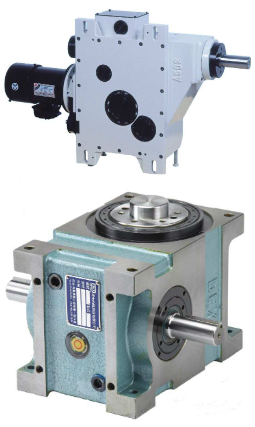
Established in 1980, The Te-shin Cam Co., Ltd. (Te-Shin) is devoted to the design and production of equipment related to computer-aided manufacturing (CAM). Its product line includes critical components, such as automatic tool changers (ATCs) and intervallic cutters.

Te-Shin boasts a large production capacity for this equipment, with a monthly output of up to 3,500 tool changers. It has become a leading industrial supplier of precision machinery in its region, and accounts for 85 percent of the Taiwanese market in its segment. The company’s intervallic cutter features high quality and an excellent cost-performance ratio, and sells for half the price of products imported from Japan.

In recent years, to meet the requirements of high-end, high-precision industries, Te-Shin invested in professional equipment for machining and grinding and adopted an advanced research and development (R&D) process based on 3D design. However, because the previous computer-aided design (CAD) system one of the industry’s leading technologies – used a traditional modeling approach, the company found it difficult to deal with customers’ design changes in real time. This led to a search for a better solution, one that would deliver integrated design, manufacturing and data management functionality to enhance the company’s competitive edge.

Easy to learn and use

After careful assessment, Te-Shin adopted Solid Edge® software from Siemens PLM Software for the drafting and design of all new tool changers. Designers find the new software to be easy to learn and use com-pared with its prior system, which involved complicated instructions and objects inter-related in a hierarchy. Designers found that system dull and time-consuming to use.

In contrast, use of Solid Edge provides an intuitive interface and a component library – a great improvement that allows designers to focus on the design of important system architectures. “What’s more, even our chairman can now easily draft some basic drawings using Solid Edge,” says Cai Peirong, deputy director of the R&D department at Te-Shin.

With Solid Edge, users can import the company’s legacy CAD drawings and manage those files, along with native models created using Solid Edge, thus reducing design and modification time, and decreasing miscommunication between design and manufacturing.

“In the past, in considering whether to adopt 3D design for new product development, our colleagues took the product life-cycle and timeliness into consideration,” explains Peirong. “But the ease of use of Solid Edge, along with the cutting-edge synchronous technology, enables us to use both 2D and 3D data effectively, which furthers the full acceptance and implementation of this new-generation, 3D design system.”

The new system was first used to provide 3D exploded views as required by customers for the purpose of including specifications in maintenance manuals. According to Peirong, “When using the previous 3D software, it normally required three days to draft an exploded view. Using Solid Edge, this is done in one day. Modifying a 3D model is as simple as modifying 2D drawings. We save valuable time.”

In addition, the adoption of synchronous technology means that design data can be updated quickly, which is an important benefit. “The synchronous modeling function allows us to update the change to the assembly drawing as we are changing the part drawing,” says Peirong. “This synchro-nous update capability effectively eliminates the consequence of changing the part drawing only and leaving the assembly drawing unchanged, which consequently might lead to errors in the subsequent operations.”

Error-free tool sequences

“In the past, when we used 2D design, there would always be blind angles during product development, which then might lead to collisions,” says Peirong. “In the worst cases, the whole mold would have to be rejected or destroyed. But with Solid Edge, we have effectively addressed the issue of drafting simulation, and avoided interlinked collisions.”

Now, once a design is finished, designers transfer it to a 2D drawing, then deliver it for mold unfolding and machining. At the machining stage, the company uses CAM Express software from Siemens PLM Software, and finds the 5-axis machining capability of CAM Express to be particularly beneficial.

One of the most prominent benefits that the 5-axis machining technology brings is a reduction in errors in tool sequence programming. The company’s original tool changer was manually programmed. Because the machining operation is com-plicated and lengthy, manual operation easily led to errors, and there were different results based on the different skill levels and experience of the operators.

“In the past, the experience of operators easily influenced the accuracy of machining. There were normally hundreds of lines of handwritten programs, and the programming logic, strong or weak, would easily affect the subsequent machining,” says Peirong. “Even if all of those aspects were free of problems, the programming itself was a time-consuming, laborious process.

“With the 5-axis machining capability of CAM Express, automatic tool sequencing and machining execution takes place immediately after drawings are drafted, eliminating a number of problems, including different personnel qualifications, wasted time and so on.”

Design changes quickly and effectively communicated

As Te-Shin’s production capacity increases yearly, there are more requirements for machinery customization. In this context, Solid Edge has become the main tool in Te-Shin’s new product design process, greatly improving the communication efficiency between the company and its customers. For example, there are more than 30 parts in an ATC, and more than one hundred in a power tower. Today, most customers use 3D design drawings to dis-cuss issues related to design changes.

A similar benefit of using 3D is reflected in the convenience it brings in collaborating with overseas customers. Currently, there are users of the company’s tool changers in China, Korea and other areas. With 3D drawings, Te-Shin is able to communicate with those customers clearly regarding design changes, which markedly reduces development time and costs. As Peirong puts it, “The use of 3D drawings helps us eliminate differences resulting from various perspectives, and, to some extent, create a common language for everyone.”

Te-Shin appreciates the rapid and effective technical support provided by Siemens PLM Software’s partner, CADEX, which has been providing assistance since the soft-ware was introduced. CADEX generally deals with any question or issue on the day it arises. CADEX also provides video training that enables designers to become productive quickly. “Most of the time, it is easy to buy a good product, but hard to get good after-sales service,” notes Peirong. “In our deployment of Solid Edge, we have been pleased with both.”

×