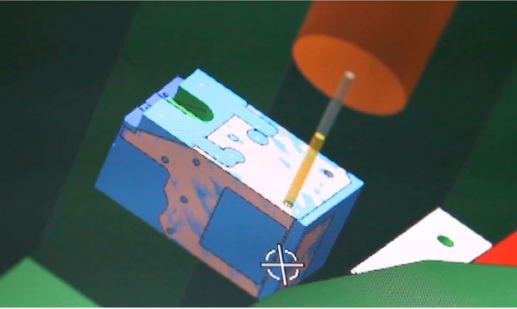

ASM Pacific Technology: Semiconductor and LED equipment supplier uses NX to achieve goal of building smart factories

Product: NX CAM
Industry: Electronics and Semiconductors

Siemens Digital Industries Software solutions enable ASM Pacific Technology Ltd. to improve production efficiency and quality by 70 percent

Looking for solutions to keep pace with advancements in electronics technology

ASM Pacific Technology Ltd. (ASM) is the world’s largest supplier of semiconductor and light-emitting diode (LED) manufacturing and assembly equipment. ASM specializes in providing LED manufacturing and assembly equipment for chip manufacturers, integrated circuit (IC) manufacturing and assembly factories, and consumer electronics manufacturers. With the acceleration of electronics technology advancements, upstream manufacturing equipment providers are tasked with producing more sophisticated equipment in shorter cycle times. As the industry leader, ASM places high value on product development and production, investing 10 percent of its yearly sales revenues into product development. But the system and geographical separations between its research and development centers and manufacturing factories (each with locations throughout Asia and Europe) created significant gaps between ASM’s design, development and production activities.

Overcoming challenges using NX CAM
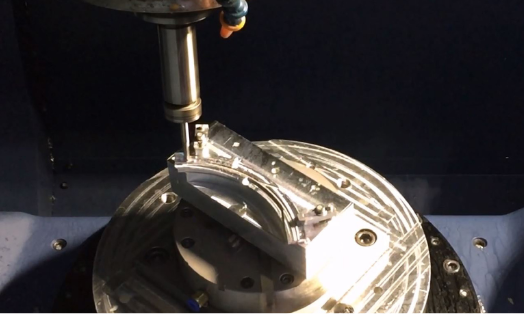
Directly applying three-dimensional (3D) product models to production/manufacturing activities proved difficult because the models lacked complete product information. Also, it was impossible for the manufacturing processes adopted by the factories to capture design intent, making it difficult for product data to flow between computer-aided design (CAD) and computer-aided manufacturing (CAM).

Because of the significant time required to transfer design changes from the product development center to manufacturing, ASM realized it needed to integrate CAD and CAM. The full integration of design and manufacturing could eliminate problems associated with design and production automation and efficiency, while supporting an upgrade of the company’s business and processes.

“Product development and production are the core parts of ASM,” says Chen Lizhi, director of ASM MIS information and tele-communications technology. “ASM invests 10 percent of sales in product development activities. We have several product development centers and manufacturing factories around the globe. In order to thoroughly eliminate the seamless connection problems in linking design and production, we decided to deploy a computerized system at the production/manufacturing stage, using NX as the standard parts machining soft-ware platform to deploy the computerized system uniformly.

“We began using NX CAM software from Siemens Digital Industries Software in manufacturing factories in 2000. We have deployed more than 100 suites in factories all over the world, including those in Shenzhen, Singapore and Malaysia.” Successful digitalization has pushed productivity to a new level.

FBM keys more efficient processes

The most immediate benefit of applying NX™ software is that its feature-based machining (FBM) capability eliminates the data barriers between design and manufacturing. With FBM technology, NX CAM can automatically read and identify product and manufacturing information (PMI), tolerances, surface machining precision, and other information attached to 3D product models, and automatically select machining methods, processes and tools while also directly driving numerical control (NC) programming and machining.

In addition, feature-based machining enables automatic transfer of related data between CAD and CAM, and automatically identifies features and creates standardized NC programs for machining processes. ASM can now minimize human error while maximizing efficiency and accuracy.

Meanwhile, with the NX CAM integrated simulation and verification (ISV) capability, significantly reducing programming errors and improving machining quality. ASM’s engineers no longer need to conduct tests on physical machine tools. Instead, they can check the NC programming of tool paths for accuracy and reliability in a virtual environment, and verify the tool path and material removal process in a 3D environment. Machine tool simulation driven by G-code drives the true movement of the machine tool’s 3D model (including fixtures and tools), thus ensuring the first-time success of machining in the real world.
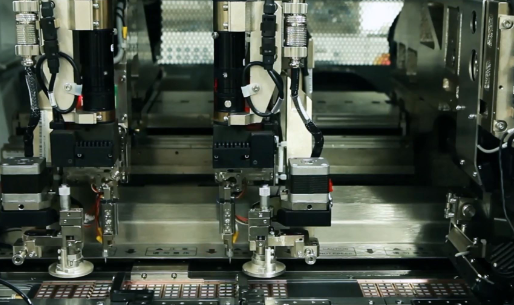
With more advanced machining and manufacturing technologies, ASM is marching toward the goal of building smart factories.

“NX CAM’s feature-based machining enables us to truly experience the seamless connection between CAD and CAM, enabling manufacturing to respond more quickly to design changes, thus significantly reducing the time of responding to user requirements and reducing time-to-market,” says Hu Dewen, senior CAD/CAM manufacturing manager at ASM. “Our statistical results show that feature-based machining and PMI have improved the production efficiency and quality of ASM by 70 percent, thus saving a lot of valuable time.”
New Goaltech ally: Creaform

New Goaltech ally: Creaform

Goaltech Engineering Solutions and Creaform are excited to announce their new partnership as an authorized distributor of the leading 3D scanners in metrology.

Creaform is a world-class company founded in 2002, which aims to manufacture and bring to market portable 3D measurement and analysis technologies that increase productivity. Its HandySCAN product has gained international reputation thanks to its portability and precision, which has made Creaform a leading provider of metrology and 3D scanning solutions for the industry.


Goaltech is a 100% Mexican company committed to the development of its customers, becoming a strategic ally in its digital transformation. Creaform’s HandySCAN 3D scanner complements 3D Systems Geomagic’s powerful reverse engineering and inspection solutions for higher accuracy and quality results in less time.

Goaltech Digitalization Expert Manuel Gutierrez comments…” We have been characterized in developing strategic alliances with high-level tools, that is why we are interested in Creaform solutions, precisely to be able to remain leaders and strategic allies in digitalization issues, with quality and high performance tools in metrology and reverse engineering issues of industrial grade that benefit all our allies”.

To make its new Goaltech alliance official, it is preparing a launch event with Creaform specialists to demonstrate the capabilities of this team for both metrology and reverse engineering, register now and set aside your place.

BOA Dials In to Better Performance Fit Systems with Figure 4 Parts

Product: DLP Printing
Industry: Consumer Products and Retail

Whether they realize it or not, over half of the cyclists in the Tour de France rely on the BOA® Fit System as they churn out mile after mile on the course. BOA is also the common thread that connects workwear, medical bracing, and sports like golf, snowboarding, and trail running – as each integrates BOA’s patented three-part fit system into high-performance products, keeping workers and athletes dialed in.

The BOA Fit System is incorporated into the products of market-leading brands across industries that partner with BOA to give their users the best in performance. Available in a range of power levels designed to match the intensity of the sport and closure force needed for the product, BOA’s performance systems are designed to deliver a fast, effortless, precision fit.

The hunt for functional 3D printed materials

One of the main components of the BOA Fit System is the dial. The dials are engineered to three different power levels depending on the lace tensions achieved by the gear they are fitted to. This includes the high power snowboard dials with gear reductions for high torque that launched BOA’s success in 2001. Daniel Hipwood is a senior design engineer at BOA who spends his time working out the mechanical design for these products.

BOA has been using 3D printing to prototype for several years now, but according to Hipwood, it has been difficult to match BOA’s applications with the material performance they need. Because BOA’s products are small and mechanical properties are paramount, many 3D printing materials could only help BOA with concept verification and aesthetics.

“We’ve been really hamstrung by the materials available to us,” says Hipwood, explaining that the parts BOA was printing were turning brittle and not holding up over time. “We’d have a concept and three days later, if the part fell off a desk in a meeting, it would just shatter into a million pieces. It’s been a real challenge to find thermoplastic-like performance at the resolutions we need, and to actually 3D print parts that function at our scale and can still hold those properties.”

Although BOA’s workflow will still include small runs of pre-production injection molded parts for the foreseeable future, the company wanted to close the gap between 3D printed part durability and final injection molded parts so it could push its designs further, faster, and with greater confidence before beginning the tooling process. Its research led BOA to 3D Systems’ Figure 4 technology and materials.

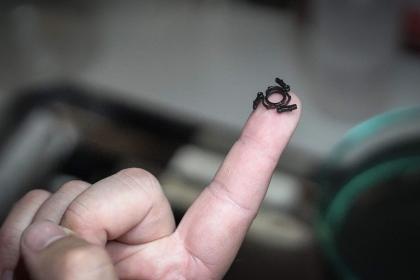
Figure 4 3D printed part on fingertip

Taking testing farther with Figure 4

Figure 4 is a projection-based additive manufacturing technology that uses a non-contact membrane to combine accuracy and amazing detail fidelity with ultra-fast print speeds. Together with 3D Systems’ production-grade Figure 4 materials, BOA is able to use the Figure 4® Standalone to get early insights into production part performance. Rather than wait the typical three weeks for machined parts, BOA can now assess the viability of its designs in the same afternoon using Figure 4.

BOA uses several of 3D Systems’ Figure 4 materials, and is particularly fond of Figure 4® PRO-BLK 10. Unlike other additive materials BOA has tried in the past, this high precision, production-grade material has long-term environmental stability and thermoplastic-like behavior. This has proved highly beneficial and answered BOA’s search for a material that would deliver resolution and performance with the ability to hold its properties. The material is working exceedingly well for BOA’s purposes, and the company is conducting ongoing correlation tests between final production parts and Figure 4 parts to understand the threshold performance requirements it needs before moving on to production. “Sometimes it’s actually one-to-one, so they’re performing the same as our injection molded components,” says Hipwood.

As part of product development, BOA likes to take viable prototypes and get them on shoes early into the design process so testers can interact with them. Even for designs that will not go on to final production, attaching dials to shoes and putting them through routine abuse helps BOA gather design and performance data on what works and what doesn’t. This aspect of testing requires the dials to be sewn directly into fabric without molded holes. According to Hipwood, finding conventional plastics that can be stitched is difficult enough, let alone finding a UV cured material that will perform without cracking. “Punching a needle through plastic is a toughness problem. You need a material that is resilient, but still maintains enough stiffness to carry out its other uses. Part count reduction is key, so that stitched component may have other important functions that require a stiff plastic material,” says Hipwood. The fact that Figure 4 PRO-BLK 10 can be used to prototype in this manner has been a major help to BOA, saving time and money to quickly iterate its designs for the highest performance.

Along with its fit system, BOA is known for its lifetime warranty: The BOA Guarantee. Product quality out of the gate is paramount and having functional printed parts helps Hipwood and the team of engineers at BOA deliver new innovative products with faster design cycles and less redesign of components after tooling creation. “Everyone is striving to shrink and optimize their products, which makes it critical to identify the weak spots as early in the design process as possible to avoid finding problems when molds have already been created.”

Additional materials in use at BOA include Figure 4® TOUGH-GRY 15, a durable gray prototyping material, and Figure 4® ELAST-BLK 10, an elastomeric prototyping material. Beyond the small mechanical parts inside the lacing dial systems, BOA uses the Figure 4 Standalone to print aesthetic proofs of concept, end-use fixturing, and rubber-grip overmolds.

A track record of success

According to Hipwood, BOA’s decision to invest in 3D Systems’ technology was twofold. The first factor was BOA’s positive experience talking with the 3D Systems team, and the level of support and expertise 3D Systems demonstrated. The second factor was 3D Systems’ track record. As the originator of the 3D printing industry with an established and robust portfolio, BOA was confident in the longevity of its investment if it worked with 3D Systems. “Other options we explored felt kind of like an alpha or beta product that wasn’t quite tested,” says Hipwood. 3D Systems’ clear focus on innovation and advancing the state of additive manufacturing made the company stand out.

BOA is happy with its decision to bring Figure 4 onboard. “There are more than a few people here who can speak to how the printer is helping them validate their work,” says Hipwood.

Interview: Dan Swartz from Ventrac speaks Synchronous and SEU

Product: Solid Edge
Industry: Automotive abd Transportation

“We looked at other products, but the Solid Edge guys were able to show us what we wanted to see, that it was turning a 2d sheet metal part and put it in 3D. They were the only ones to do that, so we went with their product.”

Dan, how did you get involved in Solid Edge First?

I have a bit of a different background from a lot of Solid Edge users. I never went to engineering school or anything like that. I started in the paint line and worked until I entered the engineering office running autoCAD. Eventually I was doing CAD Admin, and it helped make the decision about moving to Solid Edge. We also looked at other products, but the Solid Edge guys were able to show us what we wanted to see, that it was turning a 2d sheet metal part and put it in 3D. They were the only ones to do that, so we went with their product.

We started using Solid Edge with V19 (approx. 2004, two versions before ST1), coming from AutoCAD. Our lead engineer still starts product designs in AutoCAD, but one of the great things about Solid Edge is that bringing autoCAD data is so easy, and we can keep working on design.

I’ve Heard You’ve Been to Solid Edge University A Couple of Times…

Shortly after we started using the software, we also started attending annual conferences. They weren’t called Solid Edge University back then. We attend meetings in Huntsville, Nashville, Cincinnati, Atlanta.

ventrac5.jpg

These conferences are like family reunions. We were Solid Edge SharePoint beta testers, so we can talk to other beta testers and see how they come with the new versions, other Solid Edge users, and we can always see the demos of the new software. Every year there are always new things, never the same, even though we come to these conferences year after year.

There are so many different classes, you really need to take a look at the agenda and choose and choose your interests. There are so many things you can’t do everything. Ventrac usually sends between 2 and 5 people. That way we can separate and each of us sees the sessions we’re interested in. On the way home we compare notes and then back in the office we update the rest of the Solid Edge users on the things that are most important to us.

I know that for a small business like Ventrac, an event like Solid Edge University was very difficult for us to justify the cost. But we went, and what we discovered is access to information and the people we know, it’s a great way to networking, learn some tips and tricks either from other users, or Siemens professionals themselves! If you are struggling in any area on Solid Edge, this is a place to figure out how to do that! You have classes where users like me are sharing what they do and how they use SE. so it’s very easy to relate to someone there. Like Synchronous, if you don’t know how, it’s scary. But go to SEU, attend a synchronous class, and ask questions about those who are using it.

There are some things that confuse me when I’m at one of these conventions. One is when I see companies that don’t keep up with the software. And also when people don’t even try some of the best new features like Synchronous. I’ll talk to someone and they’ll ask me how I do something, and I’ll tell them, and they could say, “I’ve never seen that before” “What version are you in?” “Oh, we’re in like ST2 or something.” Of course you’re going to miss a lot of great new tools when you never upgrade to the latest version.

ventrac2.jpg

Already using ST9?

ST9 has been available for a couple of weeks, and we’re installing it on our Share Point test server. We used to install the new version when we were using only Solid Edge, but since we now use Solid Edge SharePoint, we performed a trial installation to make sure everything works with Share Point.

Shy or Tidy?

We are a sheet metal shop and we work all our straight brakes. Kids in the store like to see drawings coming from Solid Edge. Most of our things are done in Synchronous, although sometimes we come across things that have to be done neatly. It baffles me why more people don’t use Synchronous. It makes a lot more sense. It’s easy to use, and you don’t have to worry about exploiting features or long rebuild times.

Do you have Any Tips for New Solid Edge Users?

The best advice I can give anyone who asks me what to do? Attend the next SEU, stay up-to-date on maintenance versions and packages, and learn synchronously. As I said before, Synchronous has changed CAD Forever. If you’ve never attended a Solid Edge University, start today! It’s worth the money!

×