
Continental Automotive Group. Changing production requirements are handled easily with digital factory software.

Product: Tecnomatix
Industry: Automotive and Transportation

Tecnomatix Plant Simulation models give planners more flexibility; material flow simulation also increases output and reduces waste.

Making driving safe and comfortable

Continental Automotive GmbH is one of the leading automotive suppliers in the world. The company’s three divisions – Chassis & Safety, Powertrain and Interior – develop and manufacture products that make driving safer (air bags and sensors; brake and chassis control systems), more fuel efficient (gasoline and diesel injection systems) and more fun (infotainment systems and multifunctional displays).

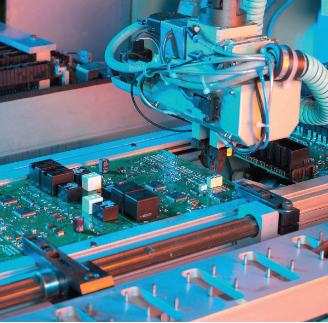
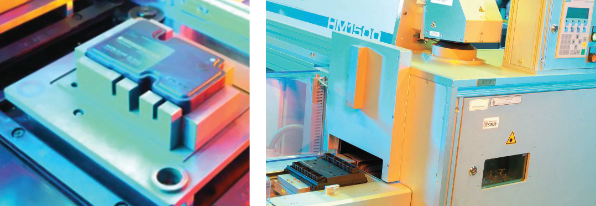
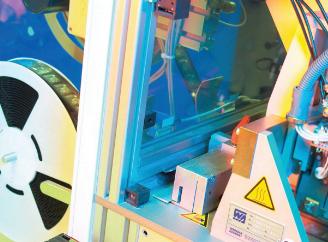
The company’s Regensburg, Germany facility is its biggest electronics plant. In an area of 16,500 square meters (approximately 177,000 square feet), nearly 2,000 employees produce about 67 million electronic devices per year. The plant operates 24/7, running 22 lines for surface-mounted devices (SMDs) along with other product-specific assembly and inspection lines.

The company’s different business units demand quite a lot from the manufacturing planners at the Regensburg plant. Frequent product alternations as well as quantity changes require repeated production line adjustments. To support the planners in this complex effort, the plant established an internal consulting agency, called the “Lean Office,” that provides the business units with an expert production infrastructure and manufacturing expertise. “We offer our customers, the individual business units, a kind of carefree package for the manufacturing of their products,” says Dr. Markus Fischer, head of industrial engineering at Continental Regensburg.

Identifying problems through simulation

The Lean Office increasingly relies on advanced technology, such as the Tecnomatix® software from Siemens PLM Software. This digital manufacturing solution was chosen after a rigorous benchmarking process – involving the production process for side airbag satellites (sensors used to detect an impact) – that turned out 120,000 parts per day, covering more than 200 variants. The task was to simulate material flow between processing stations, starting with preliminary assembly, through to SMD mounting and all the way to customized packaging. After the process was modeled in Tecnomatix Plant Simulation (in two weeks), the resulting simulation won over the plant’s management, and Tecnomatix software was quickly integrated into the Lean Office’s technology portfolio.

The office uses the Tecnomatix material flow simulation functionality to examine and optimize new production lines, as well as to optimize existing ones. The lines can be evaluated and optimized for various parameters, such as throughput, cycle times, performance limits, interferences, and so on. To make reliable predictions, simulation models must map the real line as accurately as possible. Also, modifications must be tracked carefully. Given the frequent product alternations, the goal is to quickly identify potential problems in software and fix them before the actual process begins. “With a simulation, many problems are easily fixed,” explains Stefan Lamken, a process consultant to the Lean Office and key user of Tecnomatix.

Normally at Regensburg Plant, the manufacturing planners design lines with precise and successive processing stations. In this context, a simulation model is used to verify the planned performance of the line. “For our planners, Tecnomatix Plant Simulation is a very interesting tool,” says Fischer. “An offline simulation shows solutions that sometimes surprise even the most experienced colleague.” For example, a multi-product line with up to 100 variants did not reach the theoretical targeted output. An unforeseen bottleneck unbalanced the material flow. The Tecnomatix simulation showed that a processing station was operating too quickly, resulting in jams at subsequent stations. The unexpected solution – slowing down the cycle for that particular station – would have been discovered much later had the simulation not been used.

Supporting sound financial decisions

In another situation, the goal was to increase the output of a production line. Manufacturing planners developed four possible scenarios, noting the cost of each possibility. By evaluating the four alternatives using Tecnomatix simulations, the company was able to see that the most economical approach would meet the desired goal. “We were elated with the software,” recalls Lamken. “With it, we could see that the cheapest concept delivered as much additional output as the most expensive one.” Overall, this is one of the key advantages of the Tecnomatix solution: accurate performance data on which to base financial decisions.

Tecnomatix also saves money by eliminating the need for time-consuming tests on actual production lines. For example, an SMD line occasionally bottlenecked and jammed, requiring operator intervention to resolve the problem. This jeopardized product quality and affected the line’s performance. A cooling buffer solved these problems. A Tecnomatix simulation took the solution a step further by showing how the buffer could also enable higher output. This was determined without performing any physical tests. “The possibilities of a simulation are really great for reducing costs,” says Lamken.

In addition to verifying new and revised production processes, the Lean Office uses Tecnomatix to minimize stock and to reduce waste. Questions regarding the ideal number of work-piece carriers in a line are answered in detail by the soft-ware. At the same time, simulation makes it possible to consider the effects of various external conditions, such as potential supply disturbances and personnel changes. “With Tecnomatix we are able to evaluate various scenarios in the planning stages,” says Fischer. “With this capability, we have the necessary flexibility to perfectly meet customers’ demands.”

Currently, the Lean Office uses Tecnomatix Plant Simulation models on approximately eight projects per year, although that number is growing. “Every manufacturing planner who has experienced the benefits of simulation comes back to us and our services,” says Lamken. “Digital material flow simulation with Tecnomatix has enormous potential at our Regensburg plant.”

Interview: Dan Swartz from Ventrac speaks Synchronous and SEU

Product: Solid Edge
Industry: Automotive abd Transportation

“We looked at other products, but the Solid Edge guys were able to show us what we wanted to see, that it was turning a 2d sheet metal part and put it in 3D. They were the only ones to do that, so we went with their product.”

Dan, how did you get involved in Solid Edge First?

I have a bit of a different background from a lot of Solid Edge users. I never went to engineering school or anything like that. I started in the paint line and worked until I entered the engineering office running autoCAD. Eventually I was doing CAD Admin, and it helped make the decision about moving to Solid Edge. We also looked at other products, but the Solid Edge guys were able to show us what we wanted to see, that it was turning a 2d sheet metal part and put it in 3D. They were the only ones to do that, so we went with their product.

We started using Solid Edge with V19 (approx. 2004, two versions before ST1), coming from AutoCAD. Our lead engineer still starts product designs in AutoCAD, but one of the great things about Solid Edge is that bringing autoCAD data is so easy, and we can keep working on design.

I’ve Heard You’ve Been to Solid Edge University A Couple of Times…

Shortly after we started using the software, we also started attending annual conferences. They weren’t called Solid Edge University back then. We attend meetings in Huntsville, Nashville, Cincinnati, Atlanta.

ventrac5.jpg

These conferences are like family reunions. We were Solid Edge SharePoint beta testers, so we can talk to other beta testers and see how they come with the new versions, other Solid Edge users, and we can always see the demos of the new software. Every year there are always new things, never the same, even though we come to these conferences year after year.

There are so many different classes, you really need to take a look at the agenda and choose and choose your interests. There are so many things you can’t do everything. Ventrac usually sends between 2 and 5 people. That way we can separate and each of us sees the sessions we’re interested in. On the way home we compare notes and then back in the office we update the rest of the Solid Edge users on the things that are most important to us.

I know that for a small business like Ventrac, an event like Solid Edge University was very difficult for us to justify the cost. But we went, and what we discovered is access to information and the people we know, it’s a great way to networking, learn some tips and tricks either from other users, or Siemens professionals themselves! If you are struggling in any area on Solid Edge, this is a place to figure out how to do that! You have classes where users like me are sharing what they do and how they use SE. so it’s very easy to relate to someone there. Like Synchronous, if you don’t know how, it’s scary. But go to SEU, attend a synchronous class, and ask questions about those who are using it.

There are some things that confuse me when I’m at one of these conventions. One is when I see companies that don’t keep up with the software. And also when people don’t even try some of the best new features like Synchronous. I’ll talk to someone and they’ll ask me how I do something, and I’ll tell them, and they could say, “I’ve never seen that before” “What version are you in?” “Oh, we’re in like ST2 or something.” Of course you’re going to miss a lot of great new tools when you never upgrade to the latest version.

ventrac2.jpg

Already using ST9?

ST9 has been available for a couple of weeks, and we’re installing it on our Share Point test server. We used to install the new version when we were using only Solid Edge, but since we now use Solid Edge SharePoint, we performed a trial installation to make sure everything works with Share Point.

Shy or Tidy?

We are a sheet metal shop and we work all our straight brakes. Kids in the store like to see drawings coming from Solid Edge. Most of our things are done in Synchronous, although sometimes we come across things that have to be done neatly. It baffles me why more people don’t use Synchronous. It makes a lot more sense. It’s easy to use, and you don’t have to worry about exploiting features or long rebuild times.

Do you have Any Tips for New Solid Edge Users?

The best advice I can give anyone who asks me what to do? Attend the next SEU, stay up-to-date on maintenance versions and packages, and learn synchronously. As I said before, Synchronous has changed CAD Forever. If you’ve never attended a Solid Edge University, start today! It’s worth the money!

High-precision 3D scanning to design custom chassis with Artec Eva

Product: 3DArtec Eva, Artec Studio, Geomagic Design X
Industry: Automotriz y Transporte

Of the hundreds of high-performance chassis that Jason Heard and his partner Jack Fisher have created over the years, not a single one has failed. When running outdoors or around a track at breakneck speeds, apart from a serious accident, most of what can happen does not endanger the driver’s life. Whether it’s a busted engine, an electrical system failure or a transmission break, these facts are rarely fatal. A chassis failure, on the other hand, is almost certain to be lethal. That’s what makes today’s high-performance chassis designs so demanding. If the design is too light, resistance and safety are at stake. But if more materials are used, or harder, in excess, performance will resent it. Chassis design specialists at Tekk Consulting Inc in Southern California try to achieve maximum strength-to-weight ratio on every custom chassis they build.

Their impeccable reputation in the industry allows them to book customers months in advance and a steady flow of private client projects, some very important, including large OEMs. But it wasn’t always like that. In 2018, with more than a decade of chassis design to its credit, Tekk Consulting Inc. had reached a point where, although the technical aspects of its work were perfect, they were constantly in a race against time to complete their projects while maintaining the high standards for which they are known.

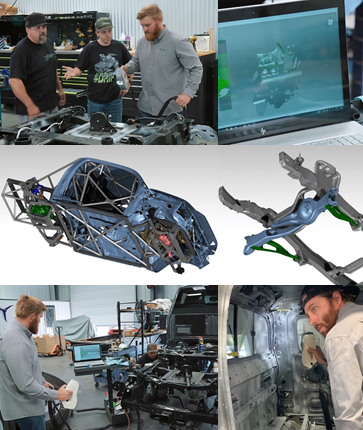
At the time it was not possible to increase the number of customers, and that meant not being able to assume the volume of projects needed to take the lead in the crazy chassis design industry. So Jason and Jack completely analyzed their workflow. They started by looking for ways to do it faster and more effectively, without sacrificing quality in the slightest. One of the first things they focused on was how they were measuring the bodies, parts and components of cars. The traditional method of using gauges, tape metrics, and rules was how they ensured that dimensions were accurate. But it was a terribly slow process, which required hours and even days for each project. They began reading about car customizers and stores that use 3D scanning to replace manual measurement methods. I saved them hours on every project, they read. They soon found their site on artec’s 3D website. Artec Eva caught his eye. A lightweight handheld 3D scanner, Eva captures millions of points every second, in minutes creating high-precision 3D models of auto parts and many other types of objects. So they called their local Artec dealer to arrange an on-site demonstration.

As Heard says, “That’s how it was. In the first 15 minutes of the demonstration, we learned that we had found our answer. So we bought it at the time. I didn’t need any training, it’s that easy to use. We didn’t even read the manual. We just bought it and then spent the rest of the afternoon scanning around the store. At the end of the day, we had our workflow underway.”

Since then, Tekk Consulting Inc has used its Artec Eva every day, in hundreds of projects including Brad Deberti’s @ThePerformanceTruck, jobs for the top 10 automakers, as well as all kinds of classics, muscle cars, multiple SEMA projects, and much more. Heard explained: “If you ask someone who works in this business, they’ll tell you this: your reputation is your life. Regardless of the reason, you don’t have to take shortcuts, because safety is everything, and never ever bite more than you might want. That means you don’t have to take shortcuts, because safety is everything, and never ever bite more than you can chew.” He continues, “Our Artec Eva gives us the power to do more and better than ever before. Without sacrificing accuracy or safety. In fact, we can now digitally capture any body structure or partial geometry presented to us, no matter how complex. Fast and accurate.”

I heard you described your scanning workflow with Eva: “For the parts and components, I built a small turntable on which I scanned the parts. If they are bright, I use some baby talcum powder or an aerosol diffuser. That adds something like 1/5000 inch to the surface lining, so it doesn’t affect the scan quality at all.” He continued: “Then I scan the piece, two passes on one side, two passes on the other, just to make sure I have it all. Then for the parts of the component machinery, to get the exact space between the bolt holes, and the holes themselves, for example, only draw them in Geomagic Design X after measuring them with a micrometer. That’s super easy and fast.” “When we’re scanning bodies and cabs,” Heard says, “we usually scan geometry broadly first. Then more slowly we’re going to scan parts of here or there. Then we align them with the scan of the first pass. After this we process the scans in Artec Studio.”

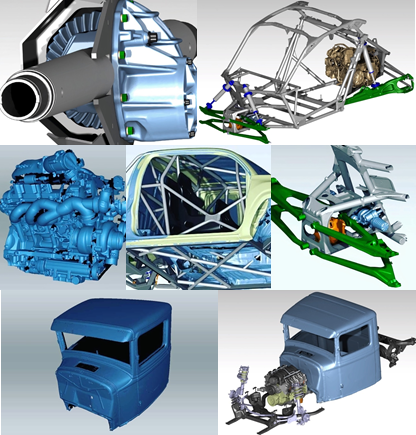
He explained his process in the Artec Studio software: “I use the Eraser tool, which allows me to easily erase everything I don’t want. The base of the turntable, any accessories, etc. Depending on how long I have, sometimes I do a self-alignment, or do it manually, and then after everything is aligned, I make a Global Record, etc.” “But in large cabins and structures, I don’t do Global Registration, I just limit myself to Sharp Fusion, because it works perfect to keep everything together and compact. After that, the scans are exported to Design X/SOLIDWORKS 2020, where they begin designing the chassis.

Eva made it possible for Tekk Consulting Inc. to maximize the space inside the truck (@ThePerformanceTruck), “where the chassis tubes are perfectly positioned against the truck deck,” which also means having extra space inside the cab, so that the head is far enough away from the chassis itself. As a safety factor, in Heard’s words, “It’s a pass.”

In the event that the car or truck is overturned, there should always be sufficient distance between the chassis and the head. With Eva, they’ve been able to maximize this. “And that for us is an incredible plus. It is the direct result of having a perfect scan of the car or truck body, which allows us to design a chassis that fits like a glove.”

Every car customizer that has ever needed CAD files from an OEM knows of the frustration, even from time to time, of waiting and waiting for them to arrive. When project deadlines approach and customers despair, that’s when patience runs out. As Heard says, “If we had to wait for CAD files before we get to work, there would be no way we could meet the tight deadlines we have, by any means. Now we don’t have to wait. We scan it ourselves, whether it’s a Porsche or a Toyota or a batch of parts, whatever.”

“And when we compare our scans with Eva with the CAD files that finally appear… wow! You wouldn’t believe how similar they are. At first we were surprised, but after hundreds of projects, we got used to it. Now we don’t even wait for CAD files. We just scan and get to work. That alone has saved us days of waiting.”

When it comes to working with classic cars, rarely, if ever, are such CAD files. That’s when 3D scanning becomes a decisive factor in the project. Heard explained: “With Eva, I can scan entire parts or chassis of classic cars.” He continued, talking about the possibilities, “I can transform it however I want into Geomagic, print it in 3D or mill it with CNC, or sell it online to companies around the world that do this kind of work. Stores with few workers who are manufacturers or builders and produce between 10 and 20 cars a year, thus operating 90% of the sector.” As for manufacturing tolerances as part of the process, these are also noticeable when scanning 3D cabs and bodies directly from the assembly line. According to Heard, “CAD files from OEMs are known to not take into account manufacturing tolerances.” He explains, “If you work with an American car, you could have a 1/4 deviation,” and that would be acceptable. In a really expensive foreign car, for example, it will be maybe 1/8″. Our scans with Eva are much more accurate than that. So when we look at the differences between 3D scans and CAD files, we consider those tolerances.”

Much more can be scanned in a day than can be measured by hand, Heard said: “For example, yesterday morning I scanned the front suspension of a new Raptor, 360 degrees, everything. Then I scanned five different race seats, added to the frame geometry, and now the scans can be taken to any CAD file when we are designing the chassis, so these seats will be perfectly mounted.”

Tekk Consulting Inc. has enthusiastically adopted 3D scanning with Eva that they have started selling their scans online through their digital market in DIYoffroad.com. Over the years they have been contacted by hundreds of car customizers and chassis designers in many countries around the world. And the market just makes it grow. Heard has been recommending Artec Eva to everyone in the sector. In his words, “I totally agree to share what we do here. Including details about the amazing technology we’ve been using. Thanks to our Eva, we are where we are today, with a lot of backlog and the ability to choose our projects.” Jason Heard imagines a future in which, “Every car workshop and designer will have their own 3D scanner and printer. The market is already moving in this direction. Specialists around the world will create digital content, for use in their stores, or to sell online to other customers.”

He also tells us: “An example: an Italian takes his Eva and scans a new Ferrari, or a classic one, with the parts he wants, fenders, bumpers, etc., and hours later he put it all together in a pack, or customizes it and turns it into a wide body kit.”

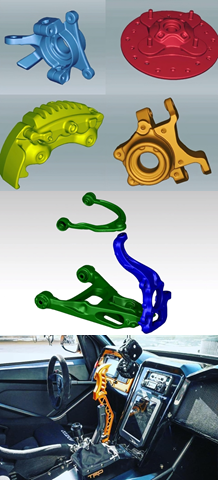
Another aspect of Tekk Consulting Inc.’s high-performance design work is Finite Element Analysis (FEA) on scanned components, usually through thin layer approximation. This involves capturing the precise dimensions of the parts and then analyzing their mechanical strength and stiffness, or how much they can bend and what that deviation looks like in the CAD. This process allows them to redesign a component to solve a point of failure, while ensuring that the component works the same or better than before.

In the past that required hand-measuring these components, which often took hours, including double checking and re-measuring. But now with their Eva in hand, they’re accurately capturing those pieces in minutes. From the control axes to the swivel joints, the anti-roll bars to the entire suspensions. There is no need to re-measure or recalculate.

Heard explained why that’s so crucial, “No matter how surprising your FEA is, if the data coming in is faulty, even for a fraction of a millimeter it can be a disaster. There is no way to improve those systems if they already come with measurement errors.” “Our Eve has been a big change for us. Now I’m going to take a lot of pieces and scan them before lunch. By the end of the day, we’ll have done all the tests and everything will be ready to create the final design.” To sum up the effect Eva has had on her work, Heard adds, “When you build race cars and there was a phase that used to take you 14 to 16 hours, and now it only takes you 2 to 3 hours, it’s a huge difference, not to mention the precision and safety that Artec Eva offers us.”

×